
Watch the full presentation about Fraud and Cybersecurity Protection for Yourself and Your Business | Greater Toms River Chamber of Commerce Lunch + Learn + Link
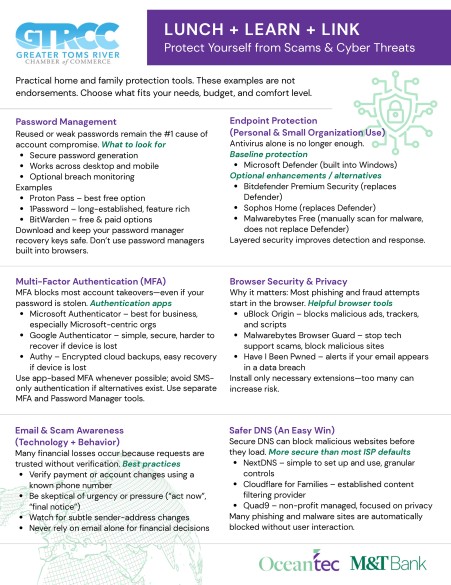
Speaker Resources Discussed at the Event:
- Small Business Fraud Prevention | Cyberattack prevention for your small business | M&T Bank
- Small Business Fraud Types | Business fraud protection | M&T Bank
- Click to download this flyer as a .pdf
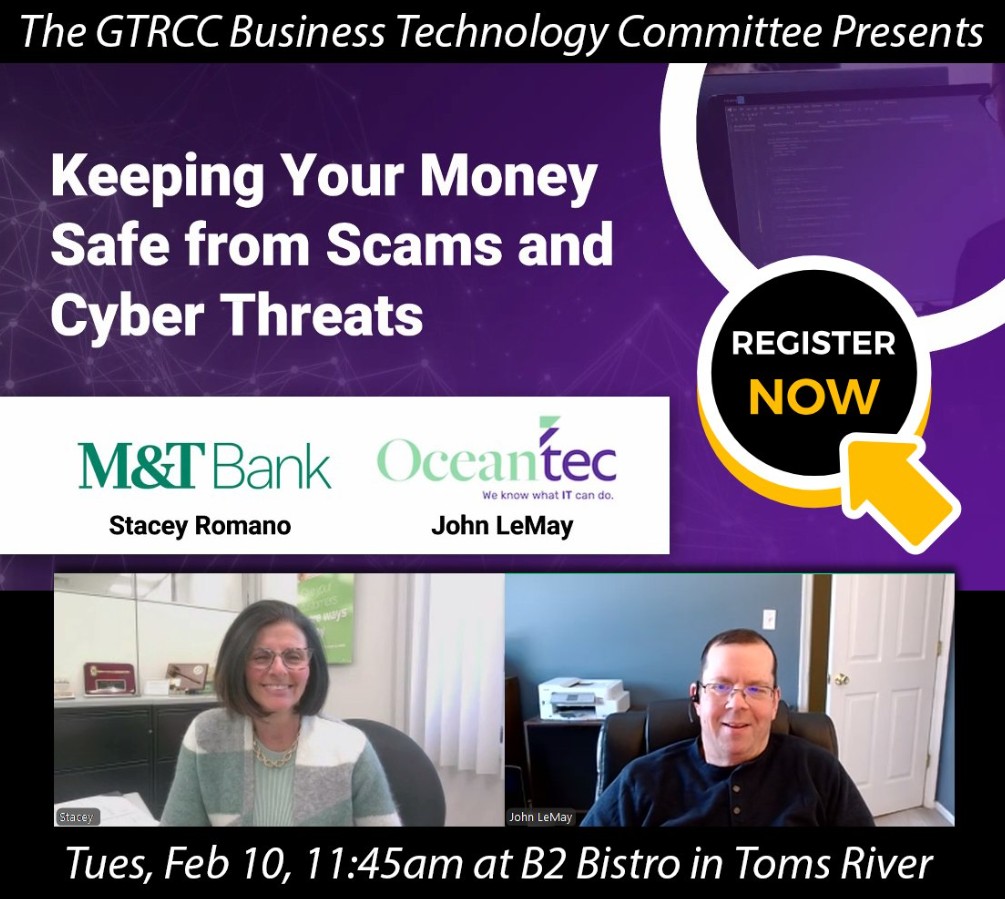
Small business owners & nonprofit leaders in the Toms River area – could a single fake email or wire request derail your cash flow?
Thank you for joining us for “Keeping Your Money Safe from Scams and Cyber Threats” – a practical, non-technical lunch program hosted by the GTRCC Business Technology Committee.
Key Takeaways from Our Lunch, Learn & Link with M&T Bank and the GTRCC
On February 10, 2026, the Greater Toms River Chamber of Commerce hosted a Lunch, Learn & Link program at B2 Bistro in Toms River: “Keeping Your Money Safe from Scams and Cyber Threats.”
The session was led by:
- Stacey Romano, M&T Bank – 30+ years in banking and cash-management
- John LeMay, founder and principal consultant at Oceantec – 30+ years in IT and cybersecurity
Together, they showed how banking controls and cybersecurity controls work hand in hand to protect your personal and business finances.
Why This Matters for Local Businesses
For most Ocean and Monmouth County businesses, one successful scam can:
- Drain a checking account or line of credit
- Disrupt payroll, vendor payments, and automatic debits
- Force you to close accounts, re-enter bill pay details, and notify customers or donors
- Eat up hours of your time dealing with police reports, claims, and cleanup
As Stacey said in the session, it’s not just about losing money once. Even when the bank can help you recover funds, the after-effects—changing accounts, updating payees, reissuing cards—can be painful and time-consuming.
That’s why the goal is to minimize risk and make your business a harder target. Fraudsters look for low-hanging fruit. If you use the tools your bank and IT provider offer, you’re far less likely to be the easy choice.
Why Online Banking Is Often Safer Than Paper Checks
Many people assume paper checks are “old-fashioned but safe” and online banking is risky. Stacey turned that assumption upside down.
What’s on a Paper Check?
Every physical check includes:
- Your name and address
- Your bank’s name
- Routing and account numbers
- Your signature
Once that check leaves your hands—whether it goes to a utility company, a vendor, or a landlord—you have no control over who sees it. A dishonest worker or mail thief can:
- Snap a photo of the check
- Sell the information on the dark web
- Have new checks printed in your name
- Copy your signature and walk into a branch to try to withdraw funds
How Online Bill Pay Works Differently
When you pay bills through your bank’s online bill payment:
- The bank pulls the money from your account into a general account
- From that general account, the bank pays the bill—usually electronically
- If a paper check must be sent, it comes from the bank’s account, not yours
The payee still sees your name as the payer, but they do not see your account and routing number, and they don’t get a copy of your signature. That significantly reduces the opportunity for check fraud.
Key takeaway:
For routine payments, online banking and bill pay often provide stronger protection than sending paper checks.
How Fraud Affects Cash Flow
Stacey also reminded everyone that fraud is a cash-flow problem, not just a security problem.
Imagine:
- $2,000 is stolen from your account over a weekend
- Your mortgage or rent check hits Monday
- Auto-drafts for car payments, utilities, or payroll start bouncing
Even if the bank eventually makes you whole, the immediate fallout can be brutal: overdraft fees, disrupted payments, and urgent calls to vendors or landlords. You may need to:
- Close the compromised account
- Re-establish all of your online payees
- Change card numbers with multiple vendors
- File police and fraud reports
Preventing the issue in the first place is far cheaper and less stressful than cleaning it up later.
Common Scam Types You Need to Recognize
Throughout the program, Stacey walked through real-world examples she’s seen at the bank:
1. Wire Fraud in Real Estate & Large Transfers
Wires are fast and final. Once a fraudulent wire goes out, there is often no way to get the money back.
- Fraudsters may impersonate a title company, business partner, or long-time friend.
- They create urgency and pressure—“Send the funds now or you’ll lose the deal.”
Banks will ask questions when a large or unusual wire is requested. That’s not to be difficult; it’s a red flag check for your protection.
Best practices:
- Always verify wire instructions by calling a known, trusted phone number (not the number in the email).
- Use dual approvals in your business: one person sets up the wire, another reviews and approves it.
2. Tech-Support and Pop-Up Scams
Fraudsters know many people are nervous about viruses and pop-ups. One common scam:
- A pop-up claims to be from Microsoft or another legitimate company:
“Your computer has a virus. Click here and call this number.” - They ask for remote access, payment, or both.
Rule of thumb:
Microsoft, your bank, the IRS, and other major institutions are not going to reach out and demand instant action via pop-up, text, or unsolicited call. Hang up, close the window, and call a known number if you’re concerned.
3. Impersonation & “Grandparent” Scams
Scammers often impersonate relatives or authority figures:
- A “grandchild” calls: “Don’t tell Mom. I’m in jail and need $5,000 for bail.”
- A fake “FBI agent” threatens arrest over fabricated charges.
- They may even send someone to your house to pick up cash or gift cards.
If a story sounds dramatic and presses you to act right now, stop and verify it with another trusted person—family, your bank, or the police.
Simple Banking Tools That Help Protect You
Stacey shared several tools available through most banks:
- Account alerts – Get notifications when your balance drops below a set amount or a card transaction goes through.
- Debit vs. credit – Debit cards pull money directly from your account. Credit cards generally offer stronger fraud protections and don’t expose your cash immediately.
- Positive Pay (for businesses) – You upload a list of checks you’ve issued. The bank only honors checks that match that list. Anything else gets flagged.
- Travel notifications – Let your bank know when and where you’ll be using your card so unusual transactions can be evaluated correctly.
These are not “extra” services; they are basic controls that dramatically cut your risk.
Have Cybersecurity Questions? Call 732-633-0500 or Contact Us to speak with A Local Oceantec expert
Where Cybersecurity Fits In: John’s Perspective
Everything Stacey described assumes attackers don’t already have access to your computer or email. That’s where John’s part of the presentation comes in.
The Relationship Between IT and Banking
Just as you should have a relationship with a local banker who knows you and your business, you should also have a relationship with an IT partner who:
- Understands your systems and how you use them
- Has already helped you put basic protections in place
- Knows how to respond quickly if something goes wrong
Trying to get help after a breach from an IT provider who doesn’t know your environment is like walking into a random bank and saying, “I think something’s wrong with my account.” It’s possible, but much harder.
Key Cyber Controls Every Business Should Use
John walked through several technical controls that small and mid-sized businesses can put in place right now.
1. Multi-Factor Authentication (MFA)
Passwords alone are not enough. If a fraudster gets your email and password, they can:
- Log into your email and reset passwords on other accounts
- Access cloud storage, banking portals, and SaaS tools
- Impersonate you in email threads with customers and vendors
MFA adds a second step—such as a code from an authenticator app or a hardware security key. Even if an attacker knows your password, they can’t log in without the second factor.
Enable MFA on:
- Online banking and merchant accounts
- Your primary email account
- Cloud file storage and collaboration tools
- Any system that holds financial or customer data
2. Password Managers
Reusing the same password across accounts is one of the biggest risks. A password manager lets you:
- Use unique, strong passwords for every site
- Store them securely in an encrypted “vault”
- Unlock them with a master password and (ideally) MFA or biometrics
Avoid saving passwords in your web browser alone; it’s not designed as a primary security tool.
3. Security Awareness Training
Most successful attacks start with someone clicking on the wrong link.
For businesses, this is a training issue, not a blame issue. John recommends:
- Short, regular security awareness videos and quizzes
- Occasional simulated phishing emails to see who clicks
- Follow-up training for staff who struggle with specific topics
Your employees handle your data and your money. They should be equipped to spot common threats.
4. Endpoint Protection (Beyond Basic Antivirus)
Classic antivirus is no longer enough. Modern endpoint protection:
- Monitors laptops, desktops, and servers for suspicious behavior
- Uses advanced detection (often AI-driven) to block attacks
- Lets your IT provider isolate a compromised machine from the network
If a staff member clicks a bad link, this can mean the difference between one infected machine and a company-wide ransomware incident.
5. Patch Management
Out-of-date software is low-hanging fruit for attackers. Good patch management means:
- Keeping operating systems and key applications up to date
- Tracking which patches didn’t apply and fixing those gaps
- Retiring old systems (including older Mac and Windows versions) that no longer receive security updates
At home, this means not running a 7-year-old Mac OS or unsupported Windows version. In business, it means regular, managed updates with reporting.
Layered Protection: Banking + Cybersecurity
The big message from both Stacey and John is that no single control is enough.
- Bank tools like alerts, positive pay, and credit monitoring are essential.
- Cyber controls like MFA, password managers, endpoint protection, and patching are just as important.
When you layer these protections and build honest, ongoing relationships with both your banker and your IT provider, you become much less attractive to fraudsters. They’ll move on to easier targets.
What You Can Do This Month
Here’s a quick action list inspired by the presentation:
- Turn on MFA for your online banking, email, and cloud accounts.
- Start using a password manager and stop reusing passwords.
- Set up account and card alerts through your bank.
- Talk to your banker about positive pay, travel notices, and wire controls.
- Ask your IT provider (or contact Oceantec) about endpoint protection, patch management, and security awareness training for your staff.
- Slow down when you get urgent emails, texts, or calls. Verify using trusted phone numbers, not the ones in the messages.
Need Help Protecting Your Business?
Oceantec works with small and mid-sized organizations across Toms River, Ocean County, and Monmouth County to strengthen cybersecurity, improve IT reliability, and coordinate with financial controls like the ones described in this session.
If you’d like to:
- Review your current protections
- Put better controls in place
- Train your team to spot scams before they cause damage
Contact us to schedule a cybersecurity and IT review.
And if you’re not already involved, consider joining the Greater Toms River Chamber of Commerce—events like this Lunch, Learn & Link are one of the best ways to stay informed, build relationships, and protect the business you’ve worked so hard to grow.
Questions? Call 732-633-0500 or Contact Us for a cybersecurity assessment for your business
Discover more from IT Computer Security Services Ocean County NJ
Subscribe to get the latest posts sent to your email.